
Playbooks
Top 6 Best Software Platforms to implement EOS® at your company
Jeremy Chatelaine · Jun 4, 2026 · 12 min read
We ranked six platforms teams should consider to run EOS® in 2026 for Traction, Accountability, and Growth.
Summarize with ChatGPTIntroduction
You read the book, it made sense, you love the idea, but EOS® framework is only half the job. The other half is adoption at your company. How you decide to implement EOS® may be the difference between a successful rollout and your team quietly abandoning it by week six.
If your business runs on EOS®, you already know the framework. Vision, Traction, Healthy. Rocks, Scorecards, Level 10 meetings. The hard part is to keep it alive in one place to really benefit from it fully. You can do that with a few spreadsheets and documents, but if you want a central place for all, you are going to need a tool your whole team will open on a Monday morning without being forced to.
This guide ranks six platforms teams use to run EOS in 2026. Some are built specifically around the framework. Some are flexible systems that happen to run it well. We cover what each one does well, where each one falls down, pricing and who it actually fits.
EOS® and Entrepreneurial Operating System® are registered trademarks of EOS Worldwide, LLC. Some of the tools below are independent products that people happily use to run the framework.
Quick comparison
| Platform | Pricing model | Open API | AI | Framework fit |
|---|---|---|---|---|
| MonsterOps | Fixed, $129/mo with unlimited users | Yes (API + Zapier) | Yes, native | Agnostic. EOS, Scaling Up, OKRs, 4DX, or hybrid |
| Ninety.io | Per seat ($12-$16/user) | Limited, on highest tier + Zapier | Some | EOS® licensed |
| BloomGrowth | $250-$499/mo +$5/seat over 25. Billed yearly | Limited | Limited | Originally built for EOS®, now positions as OS-agnostic |
| Strety | Per seat ($10-$13/mo) | Integration-first | Limited | EOS® licensed |
| ClickUp | Per seat ($7-$12/mo) | Yes | Add-on | Project Management/build-it-yourself |
| Notion | Per seat ($10-$20/mo) | Limited | Yes | Productivity tool/build-it-yourself |
Now the detail.
1. MonsterOpsWebsite
The AI-native, framework-agnostic operating system built for full adoption
Best for: teams that want a fast, intelligent system the whole company will actually use, not just leadership.
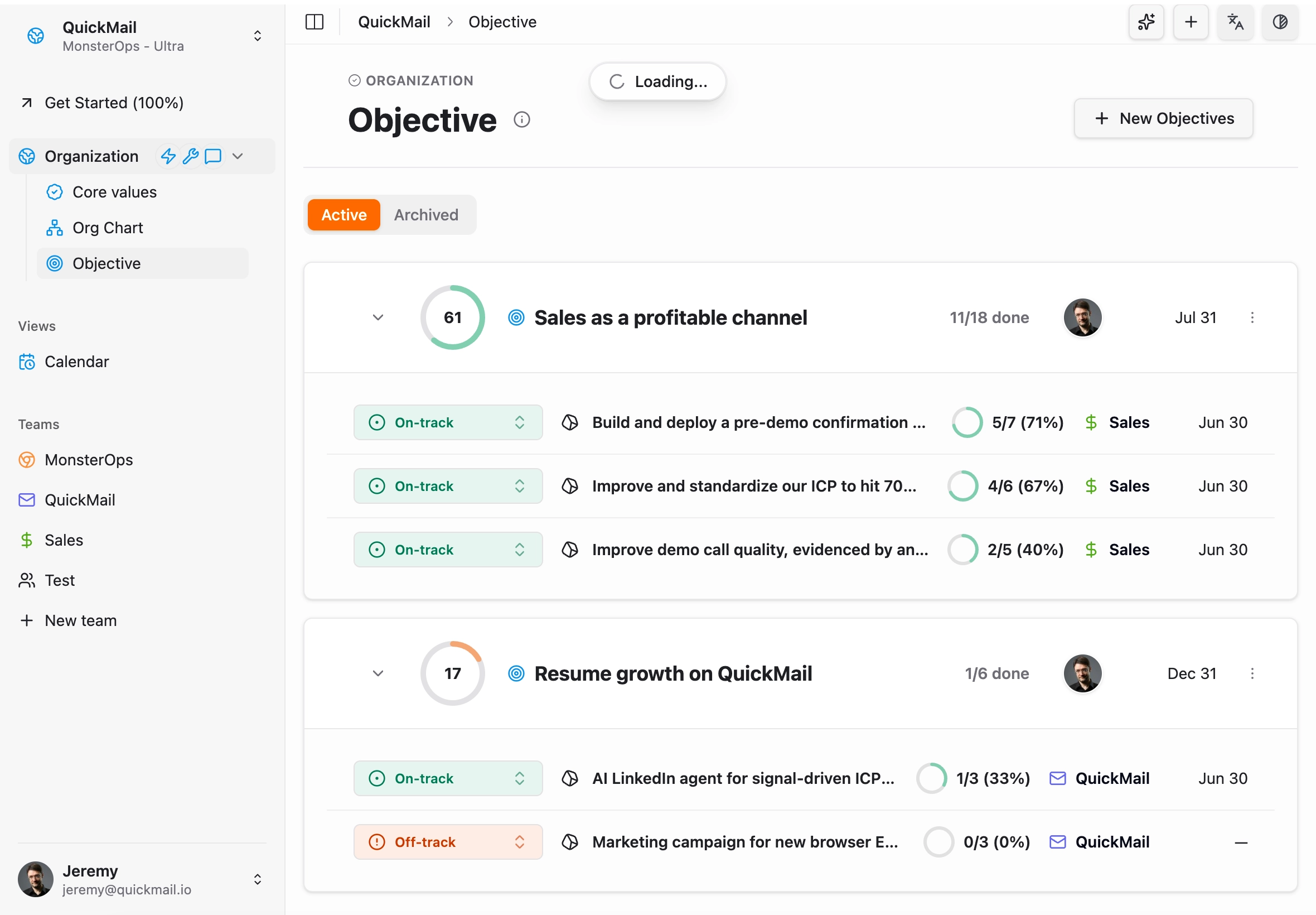
MonsterOps is a framework-agnostic business operating system that supports team running EOS® very well. Teams also run Scaling Up, OKRs, 4DX, or their own hybrid on it without switching tools. You rename what you want, you turn off what you do not use, and the system adapts to how you actually work.
What sets it apart is that AI is built into the core and can ask plain-language questions about your business at any point in time and get a helpful answer. Which rocks are at risk this quarter. What's John's performance this month? Which metric has quietly trended down for six weeks. What got decided in the leadership meeting two months ago... The system knows your operating data and can tell you, instead of making you dig.
Worth noting that while every other tool on this list charges per seat, MonsterOps charges a fixed price for its subscription. So you can invite the whole company on day one and stop thinking about managing subscriptions.
Where it wins
- AI-native, query anything. Ask about any part of your business, at any moment, in plain English. MonsterAI™ sits on top of your live operating data, so it surfaces risks, patterns, and history without you hunting for them.
- Fast, pleasant, efficient interface. Built on a modern stack with real-time updates and no lag. Nobody needs a training session to log a to-do or update a measurable. They open it and get it. That is what drives adoption across the whole company.
- Simple but powerful. Radically simple on the surface, with the depth underneath when you need it. It never makes running your business feel like filing a tax return.
- API built for the age of AI agents. A MCP server for your favorite agents, an open API and native Zapier support let you pipe in scorecard data automatically and extract the data you need and expect from a business operating system. Your data stays yours, and your agent can access everything.
- Pricing that does not punish growth. Unbeatable value for companies with many locations due to its flat fee model. Free plan for less than 10 team members. Cancel anytime, no credit card, no annual lock-in.
Where it falls short
- New to the market. It launched in 2025. Fewer case studies and a younger brand than the incumbents. If logo recognition matters more than software quality, that is a real consideration.
- Simple permissions. Access controls are intentionally lean. Very large or highly regulated orgs that need granular role-based access may find them too basic.
- Focused scope. It is an operating system, not an everything-platform. No payroll, no full HR suite, no heavy project management. It stays in its lane: meetings, visibility, and accountability.

Amber
"We transitioned away from Bloom's high costs and the manual clutter of spreadsheets. The experience has been fantastic. The platform is simple, straightforward, and intentionally avoids the extra noise that makes other tools hard to adopt."
2. Bloom GrowthWebsite
Great support, but aging software (formerly Traction Tools)
Best for: teams that value hands-on coaching and structured meetings and do not mind poor interfaces and annual contracts.
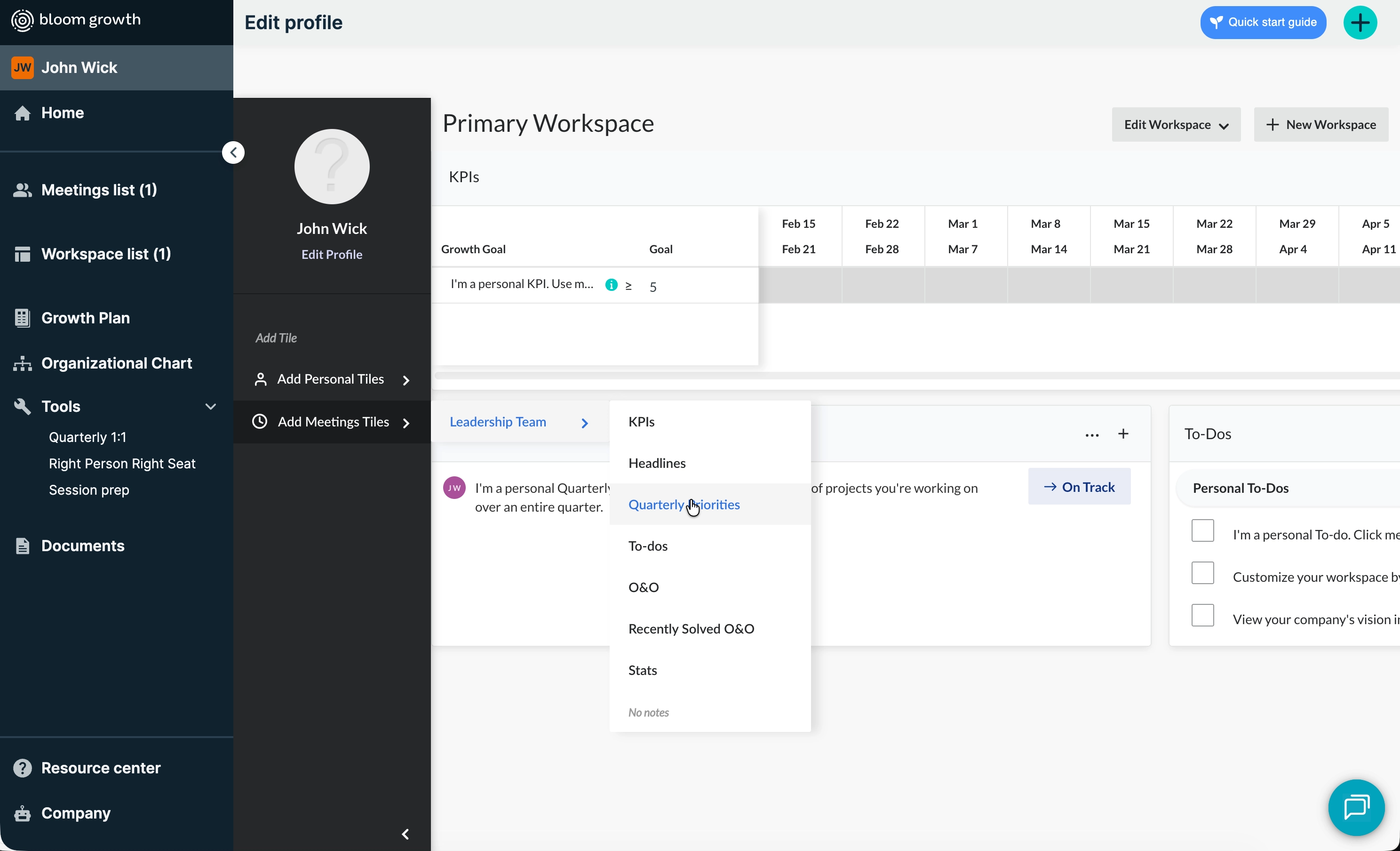
Bloom Growth started as Traction Tools, one of the original tools built specifically for EOS®, and has since repositioned as OS-agnostic. Its real strength is the human layer around the software: dedicated Success Managers and live coaches who make onboarding feel like a partnership rather than a software rollout.
Where it wins
- Best-in-class support. While many SaaS companies hide behind chatbots, Bloom gives you real people. This comes up in nearly every review.
- Strong meeting flow. Timers, a star-voting system that surfaces high-priority issues first, and automatic meeting minutes emailed the moment you end the meeting. It kills the "what did we decide?" amnesia.
- Customizable. Rename "Rocks" to "Priorities," adjust agendas, build custom workspaces. Flexible in how metrics are viewed and shared.
Where it falls short
- Dated, clunky interface. New users hesitate. There is a "New Meeting Experience" aimed at fixing this, but many users still feel underlying friction.
- Weak extra features. The People Tools (quarterly 1:1s, People Analyzer) feel thin if you expected a real HR suite. It can come across as trying to do too much.
- Mobile lags behind desktop. A common complaint on Reddit and G2. Adding an issue or checking off a to-do on the fly is not smooth.
- Annual contracts. Harder to change course if it is not the right fit. Switch early and you may pay for months you do not use. Annual commitment means ready to pay almost $3,000 from day 1. They would propose monthly contract if they were sure of their retention.
3. StretyWebsite
The all-in-one that lives inside Microsoft Teams
Best for: teams glued to Microsoft Teams that want their operating framework, HR reviews, and SOPs inside Microsoft ecosystem.
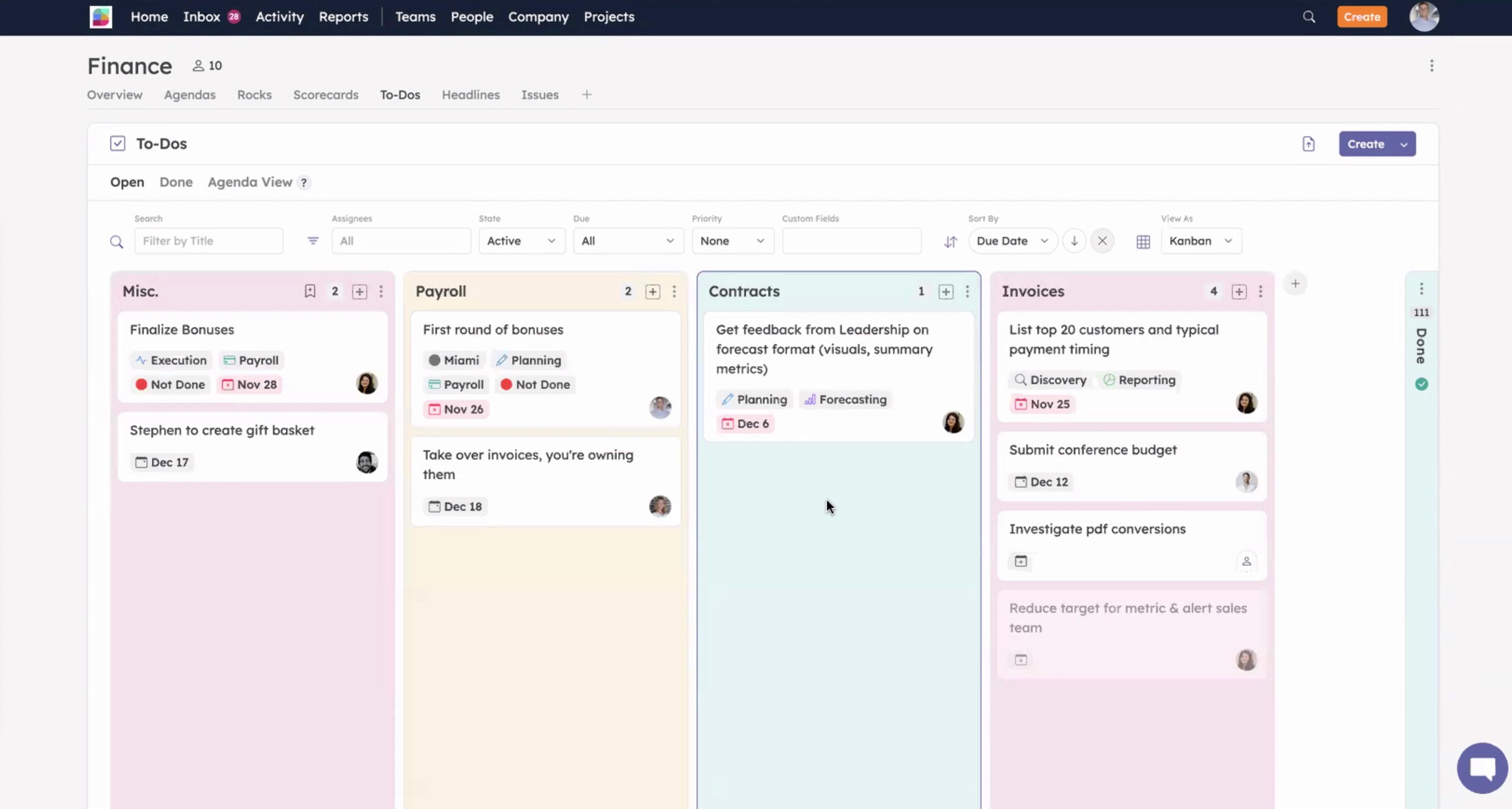
Strety was built by the creators of BrightGauge and is an officially licensed EOS® platform. Its angle is consolidation. Instead of just offering framework tools, it folds in performance reviews, one-on-ones, engagement surveys, and playbooks, then embeds the whole thing into the apps your team already uses, Microsoft Teams most of all.
Where it wins
- Genuinely all-in-one. Operating framework plus light HR plus SOPs in one connected platform. If you want to collapse several tools into one, this is the pitch.
- Deep integrations. Strong two-way connections with Microsoft Teams, Slack, Asana, HubSpot, and Google. Run a meeting inside Teams and sync to-dos to wherever your team already works.
- Official licensing. If the official EOS® stamp matters to you, Strety has it.
Where it falls short
- Feature overlap. If you already run dedicated HR or project tools, Strety's extras become redundant and can add confusion instead of removing it.
- Implementation complexity. All those layered features take more upfront effort to set up and standardize across a bigger team.
- Limited AI. AI is not the focus here. You get basic assistance, not a layer that reads your operating data and surfaces what needs attention.
- Per-seat pricing. Graduated discounts exist, but you still pay per user and have to manage licenses. Rolling it out company-wide gets expensive for essentially the same functions.
4. NinetyWebsite
The legacy leader and the safe choice for those afraid of changes
Best for: large enterprises that want strict by-the-book structure and have the budget to pay a premium for the privilege.
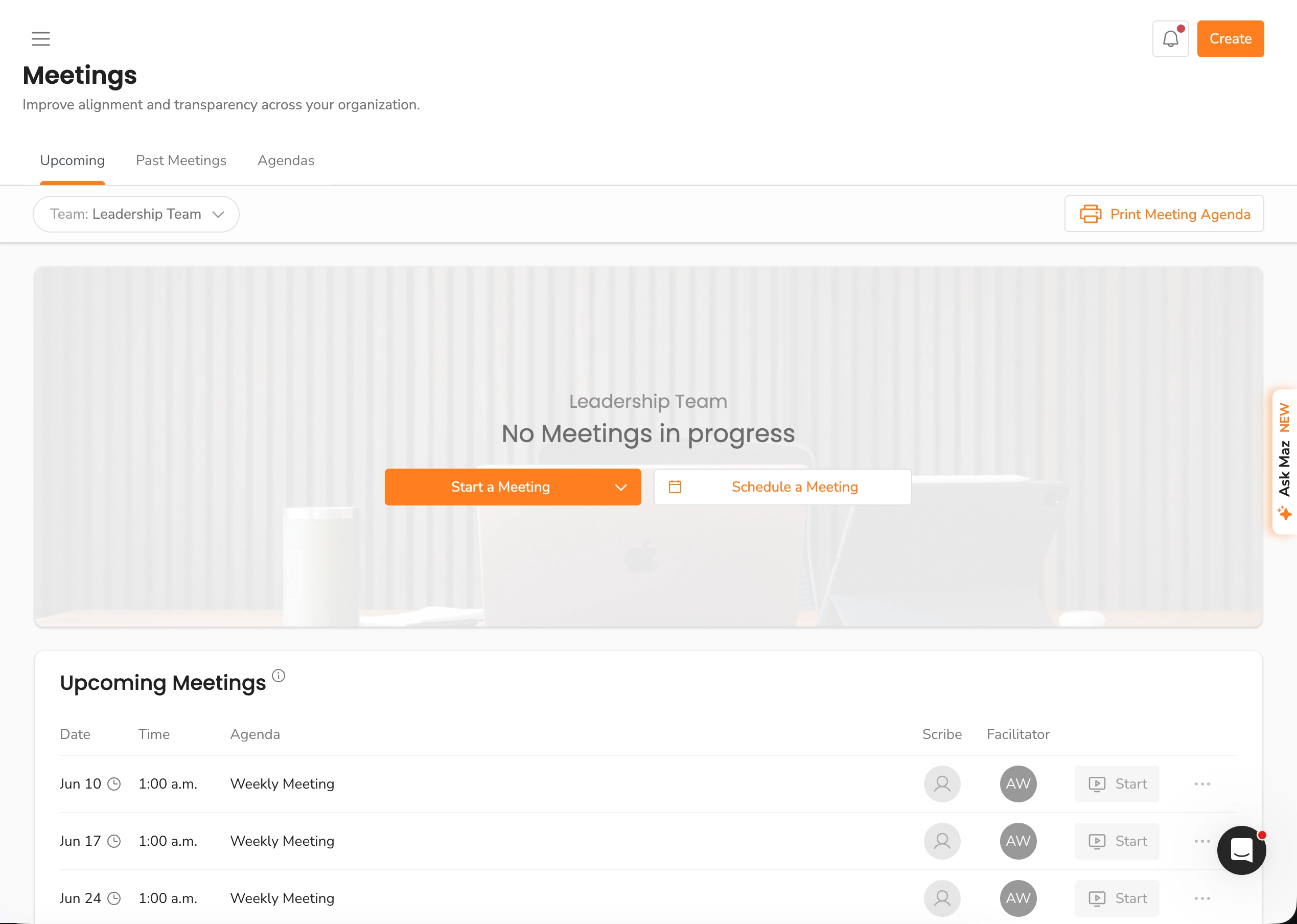
Ninety was one of the first officially licensed EOS® platforms, founded roughly nine years ago. It powers more than 40,000 businesses and has long been the default "safe" pick (the only real choice really). Every screen mirrors the language and order documented in Traction, which keeps teams from drifting into improvised operating rhythms.
If you want to run the framework exactly by the book with a coach who can log in and follow along, Ninety delivers that purity better than almost anyone.
Where it wins
- Framework purity. The terminology, the flow, and the structure match the book. Implementers adopt it widely, so your coach can reinforce best practices with zero extra onboarding.
- Mature ecosystem. Years on the market as the only serious option mean a deep bench of consultants, partners, and resources.
- Enterprise controls. For 100-plus employee orgs, the permissions and admin controls are the kind IT departments need and expect.
Where it falls short
- Slow to innovate. They just finally released their API on their highest price tier and it still doesn't allow to read your scorecard values or access all to-dos in your team.
- Dated, clunky interface. Page refreshes and modal windows. It works, but it feels like mid-2010s software, and digital-native employees will feel the pain immediately.
- Watching paint dry. Don't expect anyone on the team to be excited about the software. It's functional and as dry as you would expect any enterprise software to be.
- Thin AI. AI exists as a light helper, not a system you can actually query about your business or get coaching from. No real summaries, natural-language answers or coaching on EOS®.
- Aggressive per-seat pricing. Plans run $12 to $16 per user per month. At 25 users that is $300 to $400 a month, and the bill climbs every time you hire. It's not uncommon to have procurement provision more seats than needed or forget to remove them when people leave.
5. ClickUpWebsite
Great flexibility, big setup
Best for: operators who want the framework to sit alongside Agile, Scrum, or custom departmental workflows in a single workspace and don't mind the maintenance cost and inherent noise.
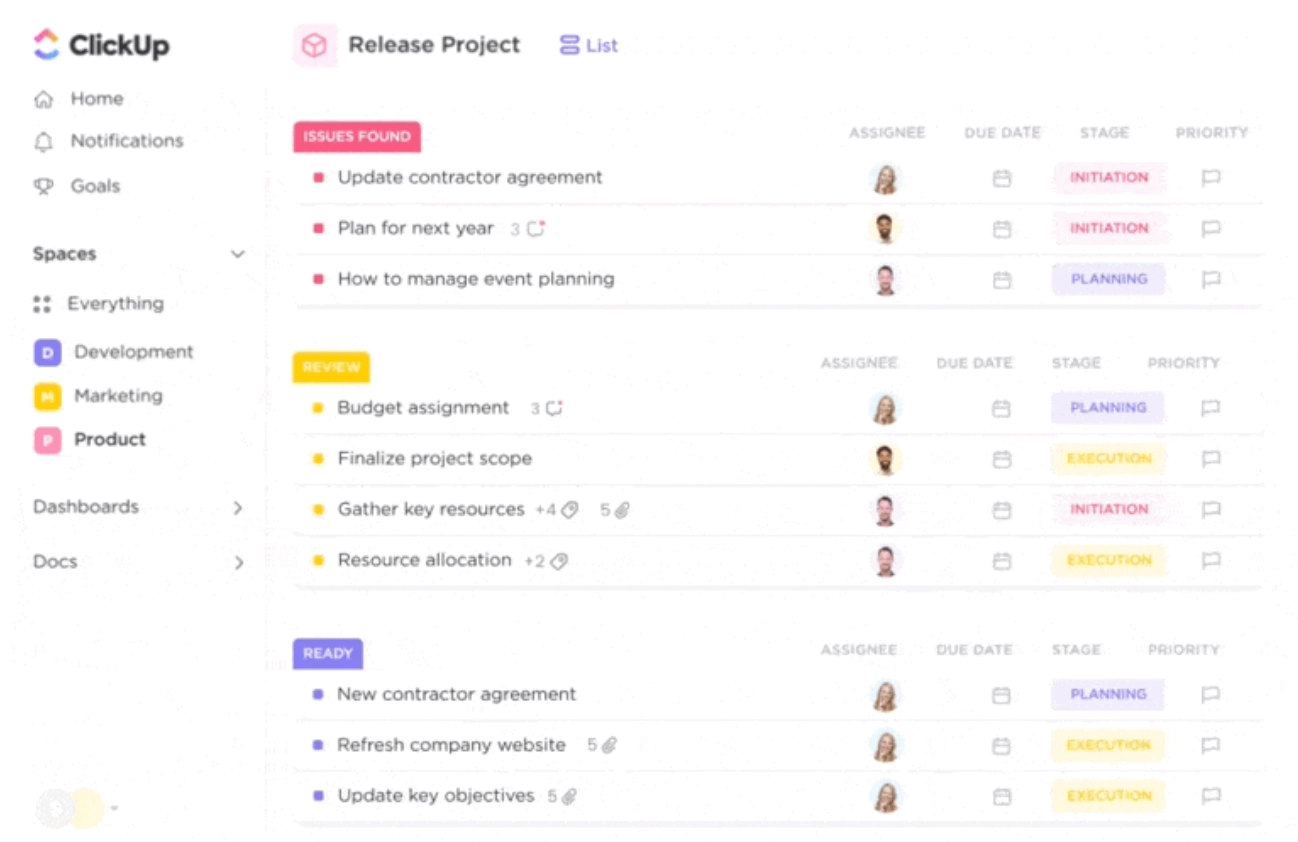
ClickUp is not framework-specific software. It is a general-purpose work platform flexible enough that disciplined teams can rebuild every artifact themselves: custom fields, dashboards, and relational databases for Rocks, Scorecards, Issues, and vision documents. Automations can update statuses and ping owners when a metric turns red.
Where it wins
- Endlessly customizable. Build the exact structure you want, then connect it to engineering sprints or marketing boards in the same tool.
- Huge integration library. Over a thousand integrations to tie your data into the wider stack.
- Automation engine. Keep statuses and metrics current without manual nudging.
Where it falls short
- Setup discipline required. Without a dedicated ops owner, the structure drifts and the framework erodes. The flexibility that helps you is the same flexibility that lets things fall apart.
- Not purpose-built. You are approximating an operating system, not running one designed for it. Expect ongoing maintenance.
- High noise. Because the same software is built for both strategic and daily operation, there is a real risk of bleeding and noise coming to the strategic planning.
6. NotionWebsite
Everything is a process
Best for: very small teams or solo operators who already live in Notion and want a cheap, lightweight setup they can shape by hand.
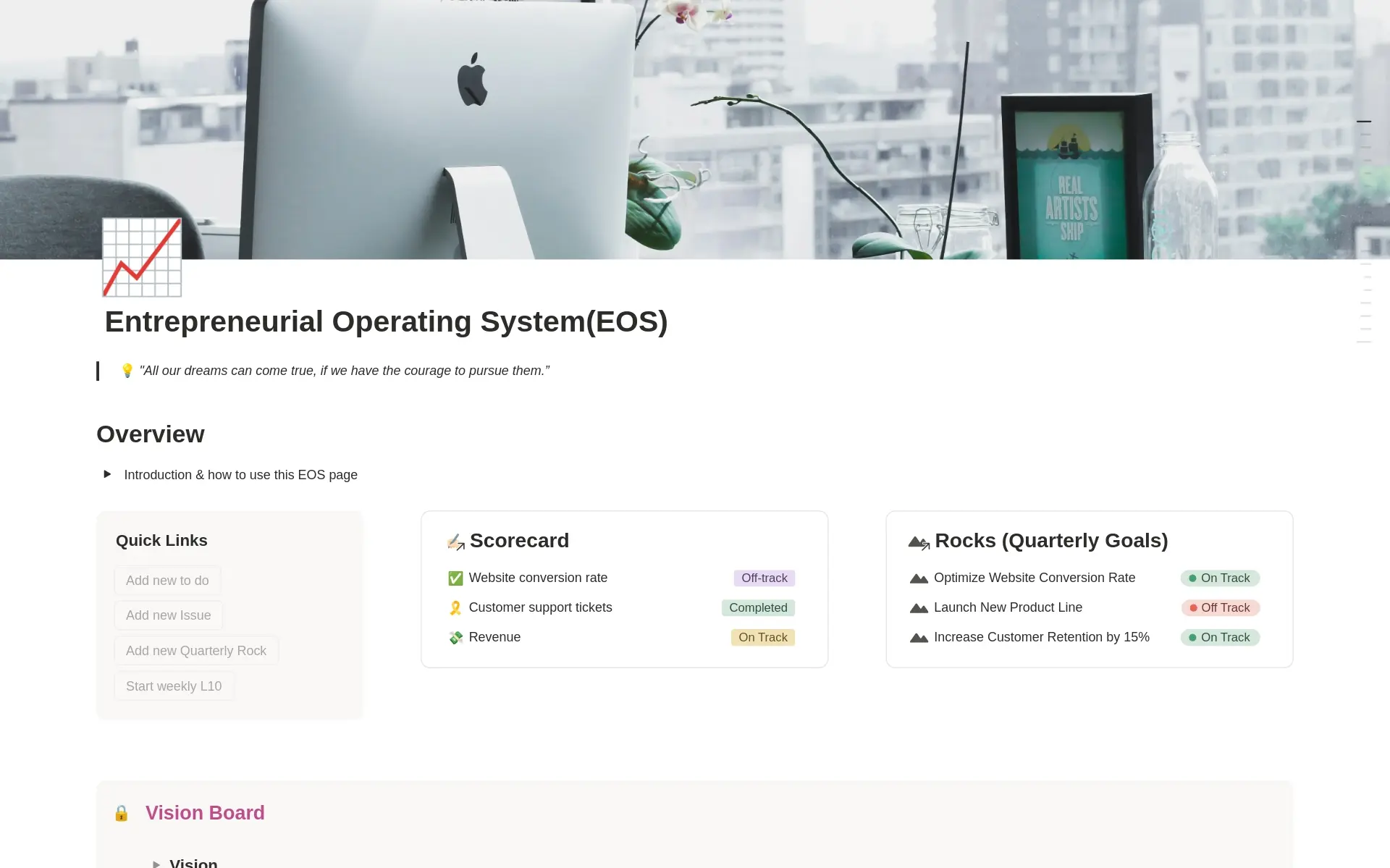
Notion is not operating-system software. It is a flexible workspace of docs and databases that a disciplined team can mold into almost anything, including a framework setup. Plenty of community templates exist for Rocks, Scorecards, and meeting agendas, and you can wire them together with relational databases and linked views.
Where it wins
- Cheap and familiar. If your team already uses Notion, you are not adding another tool or another bill. It's still a per-seat model but it provides more than just implementing EOS®.
- Total flexibility. Build the exact structure you want. Notes, wikis, and your operating cadence can all live in one place.
- Notion AI. Available as an add-on for summaries and drafting.
Where it falls short
- You are building it, not running it. There is no meeting timer, no IDS flow, no automatic scorecard surfacing. You recreate all of that manually, and you maintain it forever. The moment the person who built it gets busy, the structure rots.
- Weak at recurring cadence. Notion is built for documents, not for the disciplined weekly rhythm that makes the framework work. Scorecard automation and real-time meeting flow are not its strengths. Expect a lot of manual maintenance.
- Adoption risk. A hand-built setup only makes sense to the person who built it. Getting the whole team to follow it consistently is the same uphill battle as a spreadsheet, just prettier. Who will build the training docs on how to use it?
How to choose
Match the tool to what you actually need, not to brand recognition.
- Want the whole company using an AI-native framework with modern tech and fully functional API or MCP? MonsterOps.
- Want the official EOS stamp and strict by-the-book structure, with budget to match and don't care if your user will love having to use it? Ninety.
- Want hands-on coaching and do not mind an annual contract and dated software? Bloom Growth.
- Live inside Microsoft Teams and want HR and SOPs bundled in? Strety.
- Want to build your own blueprint and have an ops owner to maintain it? ClickUp.
- Already using Notion and don't want to use another software? Notion.
The best software is the one your team gains traction from. When the tool reinforces accountability, automates the busywork, and gets out of the way, the framework does the rest.
Cost calculator
Compare all six tools by team size
Estimate subscription cost for the platforms in this guide. Configuration, implementation, coaching, and internal admin time are not included.
MonsterOps
$99/mo
$99/mo flat with unlimited users.Ninety
$300-$400/mo
Essentials to Thrive range, using review calculator rates.Bloom Growth
$299-$499/mo
Core to Accelerate range, includes 25 users.Strety
$325/mo
Graduated pricing from the Strety calculator.ClickUp
$175-$300/mo
$7-$12/user/mo, setup time not included.Notion
$250-$500/mo
$10-$20/user/mo, template maintenance not included.Self assessment
Take our BOS quiz to see which framework fits your team best.
Try MonsterOps for a Quarter
Plug your metrics, rocks, and meetings into one simple tool that won't require your team to take additional training.
Start free